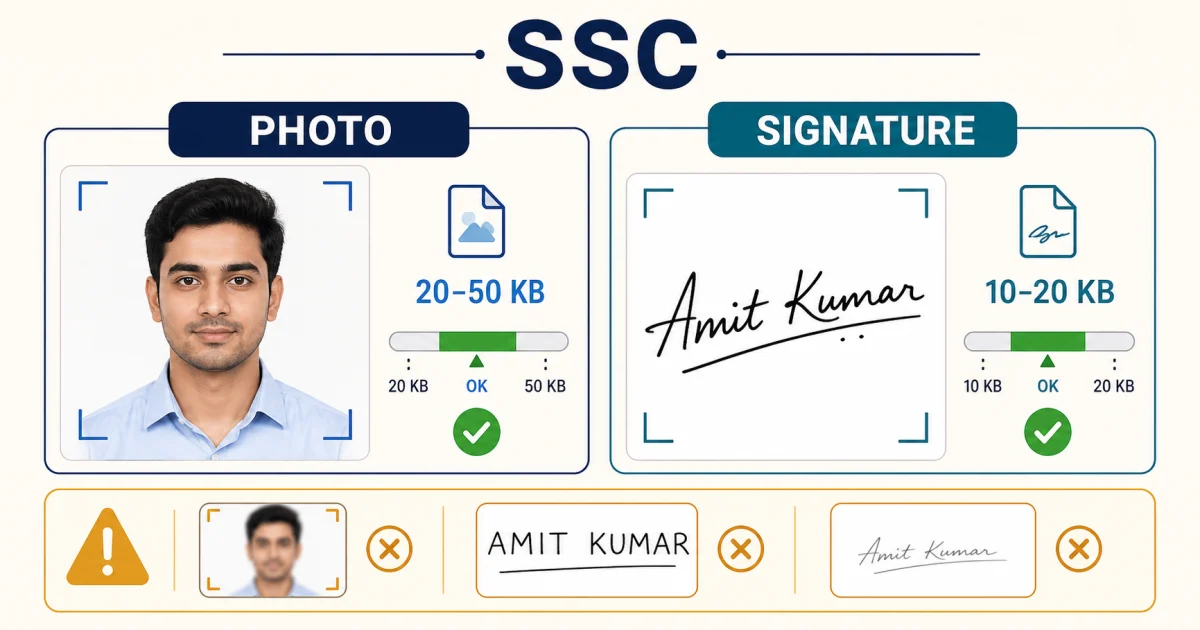
SSC photo and signature size at a glance
| Field | Size | Dimensions | Format |
|---|---|---|---|
| Photograph | 20KB – 50KB | ~3.5cm x 4.5cm, face ~40% of frame | JPEG |
| Signature | 10KB – 20KB | ~4.0cm x 3.0cm | JPEG |
Two things trip people up here. First, both fields have a floor as well as a ceiling — SSC's photo requirement is 20-50KB, not "under 50KB," so compressing as aggressively as possible can land you below 20KB and out of range just as easily as staying too large. Second, the photo must be recent: SSC's instructions require it be taken within three months of the exam notice, without a cap, and with both ears visible.
Common rejection reasons at this step
- File size outside the range — either too large to upload or, less obviously, compressed below the stated minimum.
- Signature in capital letters — SSC expects a running signature, the same one used consistently across all stages of the exam; block capitals are a documented rejection reason.
- Photo older than three months from the date the exam notice was published.
- Blurred, illegible, or cropped-wrong scans — SSC's FAQ states these are rejected summarily, with no further review.
How to hit the exact range — 3 steps
Signature first, since it's the tighter target. Open
Compress Image to 20KB
— a scanned signature on plain white paper compresses easily and reliably lands inside 10-20KB.
Photo next, since it needs to stay above 20KB too. Use
Compress Image to 50KB
as the ceiling, then check the resulting file size — if it lands well under 20KB, the source photo was unusually small or the resize was too aggressive; keep more visual detail rather than accepting the smallest possible file.
Crop to the aspect ratio before compressing, not after — resizing to roughly 3.5:4.5 (photo) or 4:3 (signature) first means the compressor doesn't have to also fix a wrongly-shaped image on top of hitting a size target.
Both tools run entirely in your browser — nothing is uploaded to compress it.
Sources and methodology
- SSC CGL application instructions (ssc.nic.in) — photo/signature size, dimensions, and format.
- SSC Frequently Asked Questions (ssc.nic.in) — documented rejection reasons.
Figures above reflect SSC's commonly published range across recent notifications. SSC re-issues detailed instructions with each exam cycle — always confirm against your specific notice before submitting.
Frequently Asked Questions
What is the SSC CGL photo size in KB?
SSC's own application instructions specify a scanned colour photograph between 20KB and 50KB, in JPEG format, roughly 3.5cm x 4.5cm, with the face taking up about 40% of the frame. Both figures are a range, not just a maximum — a file under 20KB can be rejected as readily as one over 50KB.
What is the SSC CGL signature size?
10KB to 20KB, JPEG format, roughly 4.0cm x 3.0cm (some SSC notices specify 2.0cm height instead — check the exact notice for the exam you're applying to). Sign in black ink on white paper; signatures in block capital letters are commonly rejected during verification.
Why do SSC applications get rejected at the photo/signature step?
The most common reasons, per SSC's own FAQ document: file size outside the stated range, a photo older than three months from the notice date, a signature in capital letters instead of running handwriting, and blurred or illegible scans. All four are avoidable without re-photographing anything.
Do these exact figures apply to every SSC exam?
CGL, CHSL, MTS, and SSC's other exams have historically shared the same 20-50KB photo / 10-20KB signature convention, but SSC republishes detailed instructions with each notification. Confirm the figures in your specific exam's notice before submitting — don't rely on last year's numbers.