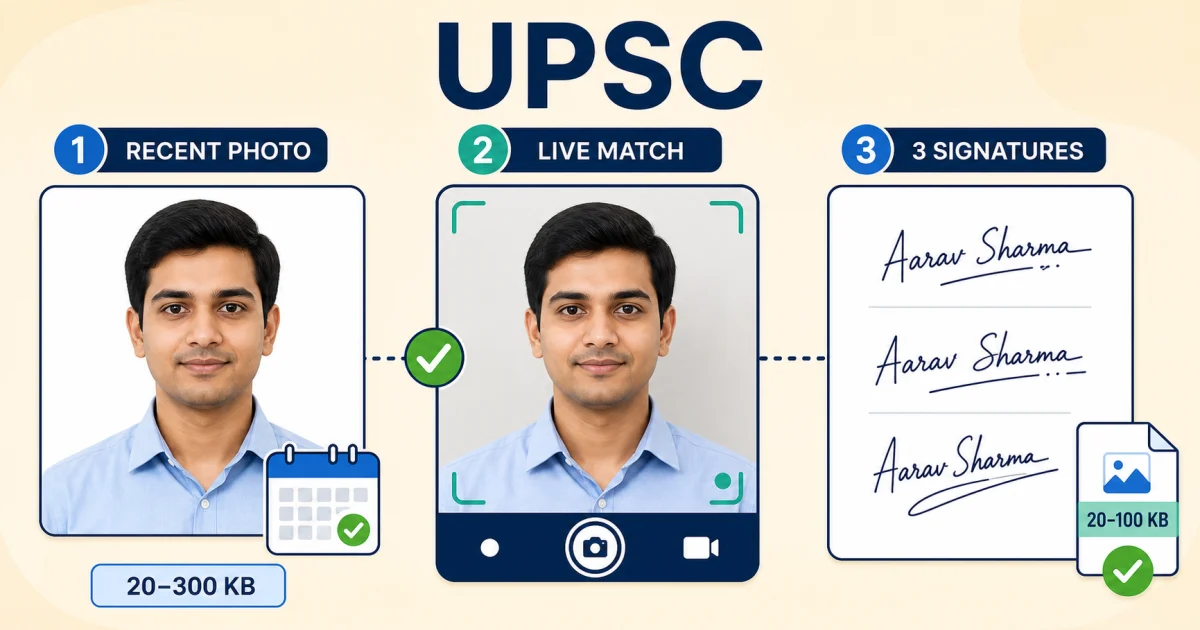
UPSC photo and signature size at a glance
| Field | Size | Dimensions | Format |
|---|---|---|---|
| Photograph | 20KB – 300KB | min. 350x350px, white background, face ~75% of frame | JPG/JPEG |
| Signature (x3, vertical) | 20KB – 100KB | ~350x150px | JPG/JPEG |
UPSC's photo window is wide (20-300KB) compared to SSC or IBPS, so hitting the size target is rarely the hard part — the two things that actually cause rejections are the three-signature format and the live photo match, neither of which exists in the same form on other Indian competitive exams.
What's different about UPSC specifically
- Three signatures, not one. Sign the same plain white sheet three times, one below the other, in black ink — then scan the whole sheet as a single image. A signature file recycled from an SSC or IBPS application will not match this format.
- Live photo match. The application system captures a live photo and compares it to your upload. Keep the uploaded photo genuine and recent rather than heavily edited.
- 10-day freshness window. Tighter than SSC's three months — plan to photograph close to when the application opens, not months ahead.
- Name and date printed on the photo itself, at the bottom — a studio photo without this needs the text added before upload.
How to prepare your files — 3 steps
Photo: crop to a square at least 350x350px, confirm the face fills roughly three-quarters of the frame, then use
Compress Image to 200KB
— comfortably inside UPSC's 20-300KB window without cutting it close at either end.
Signature sheet: scan all three signatures as one image, then compress with
Compress Image to 20KB
or
the Image Compressor's custom target
if 20KB compresses it more than the 20-100KB range wants.
Check both files against the current application cycle's exact instructions before submitting — UPSC's dimension figures vary slightly across sources, and the authoritative number is always the one in that cycle's own notification.
Compression happens in your browser — files aren't uploaded anywhere to be resized.
Sources and methodology
Figures above reflect the specifications commonly published across recent UPSC Civil Services Examination application cycles, cross-checked across multiple independent sources rather than a single one. UPSC's own notification for your specific exam and cycle (available at upsc.gov.in) is the authoritative source — confirm against it before submitting, since UPSC has changed both the signature format and the live-match requirement in recent cycles.
Frequently Asked Questions
What is the UPSC photograph size requirement?
20KB to 300KB, JPG/JPEG, minimum 350x350 pixels, white background, with the face filling roughly 75% of the frame. The photo should not be older than about 10 days from when the application window opens, and must show the candidate's name and the date it was taken printed at the bottom.
Why does UPSC ask for three signatures instead of one?
UPSC's current online application format requires three vertical signatures, one below the other, on a single plain white sheet — not the single scanned signature most other Indian exams ask for. All three must be clearly visible and consistently spaced. This is genuinely different from SSC, NEET, and IBPS, so a signature scan prepared for another exam will not meet UPSC's format.
What is UPSC's signature file size and dimension?
20KB to 100KB, JPG/JPEG, with the combined three-signature image typically expected around 350x150 pixels (a wide, short rectangle to fit three signatures stacked vertically).
What is UPSC's live photo match, and does it affect the uploaded photo?
UPSC's application system captures a live photo during form-filling and compares it against the uploaded passport photograph; a mismatch can block the application from proceeding. Practically, this means the uploaded photo should be a genuine, recent, unedited likeness rather than a heavily retouched or outdated one — cosmetic editing beyond basic size/format compression risks a mismatch.