The short answer
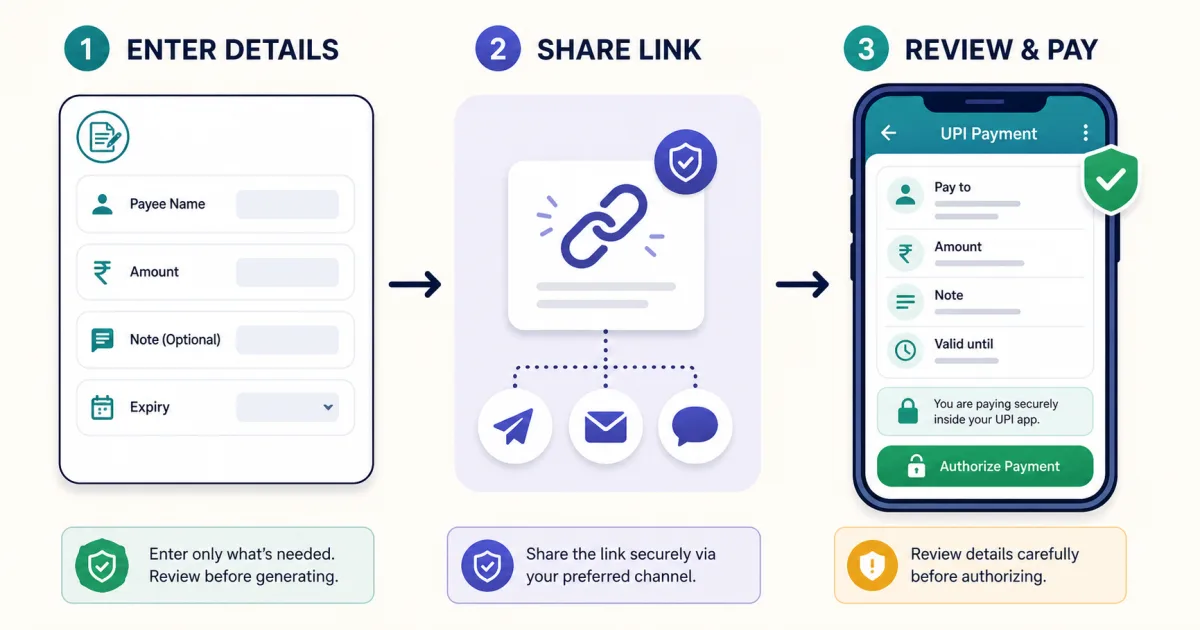
Open the UPI Payment Link Generator, enter the payee's
UPI ID and name, choose whether to prefill an amount, and add an optional note. The tool creates a standard
upi://pay intent plus a shareable browser link. Send the browser link through your preferred channel;
the payer opens it, chooses a compatible UPI app, checks the recipient and amount, and authorizes in that app.
A payment link does not move money by itself, verify the recipient, or prove that you received a payment. It only transfers payment instructions to the payer's app.
How to create a UPI payment link—5 steps
Enter your UPI ID. Use the address linked to the account where you want to receive the money, such as
name@handle. A valid-looking format does not prove that the account exists, so check it in your own UPI app first.Add the payee name. Enter the person or shop name the payer expects to see. The payer should compare this with the name their UPI app resolves before paying.
Choose the amount mode. Add a fixed amount for a particular bill, or let the payer enter the amount for donations, tips or variable totals.
Add a useful note. An order number, invoice number or short purpose is more useful than a vague message. Do not put passwords, PINs or sensitive personal information in it.
Copy and test the shareable link. Open it on another device if possible and confirm that the intended UPI ID, name, amount and note appear before sharing it widely.
What the payment link contains
| Detail | Purpose | Important limitation |
|---|---|---|
| UPI ID and payee name | Tell the UPI app where the payment should go and what name to display. | Typed text is not proof of identity; rely on the recipient resolved by the payer's app. |
| Amount | Prefills a bill total when included. | The receiving app decides how it displays or permits changes to the amount. |
| Note and reference | Provide context and a local reference for reconciliation. | They are labels, not a bank-issued transaction ID or confirmation. |
Universal intent, app-specific link or shareable link?
Universal UPI intent: the standard
upi://payform. On a compatible phone it can offer installed UPI apps that handle the scheme.App-specific link: attempts to open a particular supported app. It will not help if that app is missing, and support can vary across Android, iOS and browsers.
Toolsda shareable link: opens a browser landing page that decodes the payment details locally, presents available payment choices, and can show a QR fallback on desktop.
Use the shareable browser link when you do not know which app or device the payer uses. Keep a plain UPI ID available as a fallback.
Why the link behaves differently on mobile and desktop
A phone can hand a custom UPI scheme to an installed payment app. A desktop usually has no UPI app registered to handle that scheme, so opening it may do nothing or show an error. The Toolsda landing page uses a QR fallback for that situation: the payer scans the QR using a UPI app on their phone and reviews the same instructions there.
Privacy and safety before you share
- The generator runs in the browser and does not require your UPI PIN, bank password or OTP.
- A shareable link necessarily exposes the payee details it carries to anyone who receives or forwards it.
- The URL-fragment payload is encoded for transport, not encrypted or signed.
- Never enter a UPI PIN on the Toolsda page; authorization belongs inside the payer's trusted UPI app.
- Confirm successful receipt in your own bank or UPI app, not from a screenshot sent by the payer.
NPCI states that a UPI PIN authorizes a bank transaction and should not be shared. Its fraud guidance also warns that scanning a QR and entering a PIN is for making a payment, not receiving one.
Payment link or UPI QR code—which should you use?
Use a payment link when the payer will receive the request on the same phone through chat, SMS or email. Use a
UPI QR code for a printed counter card, invoice, second screen or
face-to-face payment. Both can carry similar upi://pay instructions; the main difference is whether
the payer taps a link or scans an image.
Related UPI guides and tools
Sources and methodology
- NPCI: About UPI — UPI participants, virtual addresses, QR and intent-based payments.
- NPCI: UPI FAQs — UPI PIN, payment authorization and transaction confirmation.
- NPCI: Fraud Awareness — QR and UPI PIN safety guidance.
- NPCI: UPI intent guidance — intent parameters and transaction references.
Tool-specific statements were checked against the current Toolsda implementation: it builds the standard UPI intent and app-specific variants locally, stores the shareable-page payload in a URL fragment, and applies expiry only in the browser landing page.
Frequently Asked Questions
What is a UPI payment link?
A UPI payment link carries payment instructions such as the payee UPI ID, name, optional amount, note and reference. On a compatible phone, opening the UPI intent hands those details to an installed UPI app so the payer can review and authorize the payment.
Will the same UPI link work with GPay, PhonePe, Paytm and BHIM?
The standard upi://pay intent is designed for interoperable UPI apps, but the exact opening behavior depends on the device, browser, installed apps and app settings. Toolsda also provides a shareable browser link and app-specific options; the payer should still verify the details in the app that opens.
Can I create a UPI link without fixing the amount?
Yes. Choose the option that lets the customer enter the amount. The link will carry the payee details but omit a fixed amount, so the payer types it in their UPI app.
Does a payment link confirm that I received the money?
No. The link only prepares a payment request. Confirm receipt in your own UPI app or bank account and match the successful transaction reference; do not rely on a screenshot or on the fact that someone opened the link.
Does Toolsda store my UPI ID or payment link?
The generator builds the payment instructions in your browser. The shareable Toolsda link places its payload after the URL's # fragment so it can be decoded on the recipient's device without a database record. The payload is encoded, not encrypted, so anyone who receives the link should be treated as able to see its payment details.
Is an expiring UPI link a security control?
No. Toolsda's expiry is a convenience check performed by the browser landing page; it is not a bank-side expiry, signed invoice or guarantee that a copied UPI intent cannot be reconstructed. Use it to reduce accidental reuse, not as proof that a payment request is secure.